Three.js / Shaders
Three.js shaders: GLSL, TSL and WebGPU
Shaders are where a scene stops looking like a tutorial. Here is how they work in Three.js, when to write GLSL and when to write TSL, and what WebGPU changes.
- 01How the GPU actually runs them
- 02GLSL for WebGL, TSL for both
- 03What WebGPU adds
- 04The tools worth using
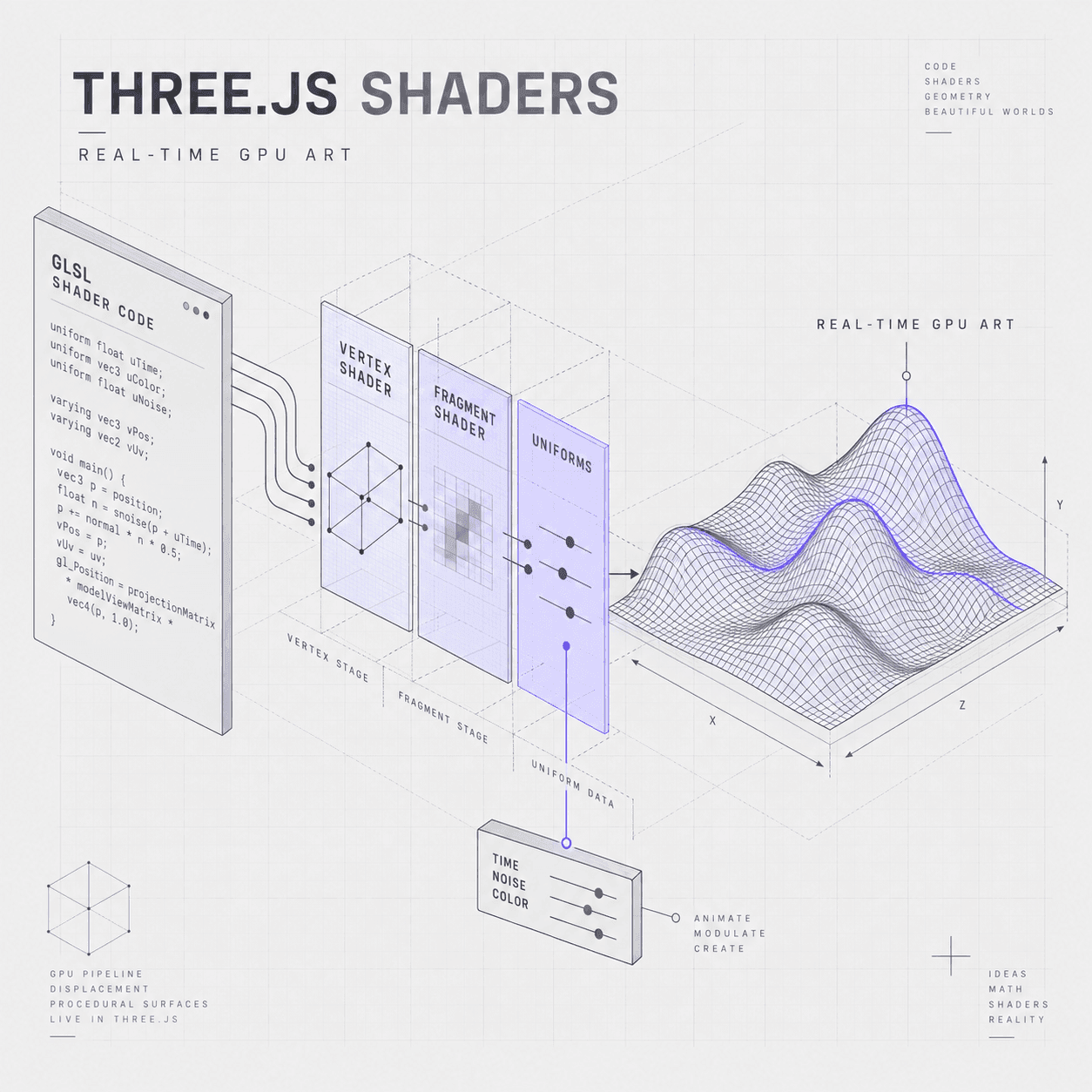
A shader is a small program that runs on the GPU: a vertex shader decides where each point of a mesh ends up, and a fragment shader decides what colour each pixel becomes. In Three.js you write them as GLSL for the WebGL renderer, or as TSL node graphs, which compile to WGSL for WebGPU and to GLSL for WebGL from the same source.
What a shader is doing
Everything you see in a Three.js scene was drawn by a shader, whether you wrote one or not. The built-in materials ship with their own, and the moment you want a look those materials cannot produce, you are writing your own.
The GPU runs your shader once per vertex and then once per pixel, thousands of times in parallel, which is why it is fast and also why it is unforgiving. There are no loops over the scene and no reading the frame you just drew.
Vertex shader
Runs once per vertex. It takes the mesh position and returns where that point lands on screen, which is how displacement, waving grass and morphing geometry happen.
Fragment shader
Runs once per pixel the mesh covers. It returns a colour, which is where lighting models, gradients, noise, patterns and most of the visible effect live.
Compute shader
WebGPU only. It runs over data rather than geometry, which is how particle systems, physics and simulations move onto the GPU instead of running in JavaScript each frame.
The two ways to write them
GLSL or TSL
GLSL is the shading language WebGL uses. In Three.js it arrives as strings passed to a ShaderMaterial, or as patches applied to a built-in material through onBeforeCompile. It is well documented, every tutorial written before 2024 uses it, and it only runs on the WebGL renderer.
TSL, the Three.js Shading Language, is a JavaScript node system rather than a string. You compose nodes and Three.js compiles the graph to WGSL for WebGPU and to GLSL for WebGL, so one source runs on both. It also composes with the built-in materials instead of replacing them, so you can change one part of a standard material rather than rewriting lighting from scratch.
For new work, TSL is the better starting point: it survives the fallback, it is typed JavaScript your editor understands, and it is where the library is heading. GLSL is still worth reading, because most of the reference material you will find is written in it.
What changes on WebGPU
Shaders under WebGPU
WebGPU does not change what a shader is. The vertex and fragment stages work the same way, and a TSL material renders identically on either backend.
What it adds is the compute stage. WebGL could only draw; WebGPU can run a shader over an arbitrary buffer and write the results back, which is what moves particle simulation, physics and procedural generation onto the GPU. It also carries lower CPU overhead per draw call, which matters once a scene has many objects.
Because WebGPURenderer falls back to WebGL on its own, a project can adopt it without cutting anyone off. The compute work is the part that has no fallback, so treat it as an enhancement rather than a dependency.
Where shader work goes wrong
The failure modes worth knowing
Silent failures. A shader that will not compile renders nothing, often with no error you would notice. On WebGPU a wrong node graph is quieter still. Build in small steps and check after each one.
Fragment cost. A fragment shader runs once per pixel, so a full-screen effect on a high-density phone screen is millions of executions per frame. Expensive maths that is invisible on a desktop halves the frame rate on a phone.
Precision. Mobile GPUs default to lower float precision than desktop, so noise and large coordinate values that look correct on your machine can band or wobble on a phone. Test on a real device rather than a resized window.
Want to write shaders yourself?
Learn TSL — the Three.js Shading Language — step by step in our interactive shader course, with live code you edit in the browser.
Building a site around this kind of work?
Shader-driven visuals are the cheapest 3D on the web — kilobytes rather than megabytes. My guide covers where that holds up, what it costs, and how to keep Core Web Vitals intact.
Loading...
0 / 11 tools
Know a shaders tool that belongs here?
Submit it to the directory. Every submission is reviewed before it appears.
F.A.Q
Frequently asked questions
What people ask about Three.js shaders.
The basics
What they are and how they run.
A shader is a program that runs on the GPU while the scene is drawn. The vertex shader decides where each point of a mesh ends up on screen, and the fragment shader decides what colour each pixel becomes. Three.js built-in materials come with their own shaders; you write your own when you need a look the built-in materials cannot produce.
Not any more. TSL lets you write materials and effects as JavaScript node graphs, which Three.js compiles to WGSL for WebGPU and GLSL for WebGL. Reading GLSL is still useful because most existing tutorials and shader references are written in it, but it is no longer the entry requirement it used to be.
In practice
Languages, cost and frameworks.
TSL is the Three.js Shading Language: a node system written in JavaScript for materials, post-processing and compute shaders. It compiles to WGSL on the WebGPU renderer and to GLSL on WebGL, so one source runs on both backends, and it extends the built-in materials rather than replacing them.
They are usually far lighter to download, because a procedural effect is kilobytes of code rather than megabytes of texture. They are not free at runtime: a fragment shader runs once per pixel, so an expensive effect costs frame rate rather than bandwidth. The trade is bandwidth for GPU time.
Yes. R3F creates the same Three.js objects underneath, so a ShaderMaterial or a TSL node material works the same way, declared as a component instead of constructed imperatively.
Learn to write them yourself
The TSL course goes from your first node material to compute shaders and post-processing, with live code you edit in the browser and watch recompile.